Installing Olive 10.4R1 under VMware
It's been a long time since I've taken a run at getting Olive up and working. I wanted to take another stab at it and document how to get a working Olive installation using the latest JUNOS code. I also wanted to document how to get Olive up inside VMware ESXi since I hadn't actually done that before.
Update June 3 2011: Mention that it's ESXi that I'm working with.
Overview⌗
The installation breaks down into four major steps:
- Gather prerequisites
- Create virtual machine
- Install FreeBSD
- Install JUNOS
Prerequisites⌗
I had these items on-hand before starting:
- FreeBSD 4.11 mini-iso (I specifically needed 4.11; more on this below)
- A copy of the jinstall 10.4R1 package (specifically, I used the M/MX/T series install package)
- A working installation of ESXi 4.1u1
I will not share copies of any Juniper software so please don't ask. You will need a valid Juniper support contract to download the jinstall bundle.
Create the Virtual Machine⌗
The VM is pretty basic:
- 1 vCPU
- 512MB RAM
- 10.4 requires a minimum of 512MB
- CD/DVD drive
- Not needed for Olive, but needed to install FreeBSD
- e1000 network adapter(s)
- The e1000 adapter type causes VMware to present an Intel based chip to the VM which JUNOS is capable of using.
- Hard drive
- I used the default size of 8G which turns out to be more than enough. My final Olive install is sitting around 1G used.
- Guest OS: FreeBSD 32-bit
Install FreeBSD⌗
Through some experimentation and reading of the em(4) man page I found that FreeBSD 4.11 is the only 4.x release that supports the Intel 82545EM chipset. This is the chipset that is emulated by VMware (at least under ESXi 4.1) when choosing the e1000 network adapter type. If you install something older than 4.11 you will not have any network interfaces that are usable by Olive.
Once the VM was created I connected its CD/DVD drive to the FreeBSD ISO I downloaded and powered on the VM. I ran through the FreeBSD installation, choosing the "standard" installation. I told fdisk to use the entire disk (option A) and laid out my disklabels like so:
| Part | Mount | Size |
| a | / | 1G |
| b | swap | 1G |
| e | /config | 12M |
| f | /var | 6G |
The /var disklabel needs to be big enough to hold future software update bundles, core dumps, log files, etc. On my fresh install it's sitting at just under 700M used. If the JUNOS installer doesn't like your disk layout, it seems it'll tweak it to meet its needs. It also doesn't matter if you install FreeBSD on a UFS2 or softupdate-enabled disklabel as JUNOS will reformat it for UFS.
Finally, I chose the "user" distribution, waited for the files to copy and then said "no" to all of the questions the installer asks afterward (things like, install ports collection? enable NTP? setup the network? etc). After rebooting from the hard drive, I was ready to install JUNOS.
Installing JUNOS⌗
Ok, as I wrote earlier, I downloaded the jinstall package from Juniper. This is basically a FreeBSD binary package that is installed with pkg_add(1). However, this package expects it's being installed on true Juniper hardware so some of the checks it does during installation fail under generic FreeBSD.
The first error I got was:
sysctl: unknown oid 'hw.re.model'
ERROR hw.re.name sysctl not supported.
This comes from the +INSTALL file because, as the first line in the error says, there is no hw.re.model sysctl oid in FreeBSD. I fixed this by uncompressing the jinstall-X-domestic-signed.tgz file and editing the +INSTALL file by replacing the sysctl line in the check_arch_compatibility() function with a line that assigns a dummy value to re_name.
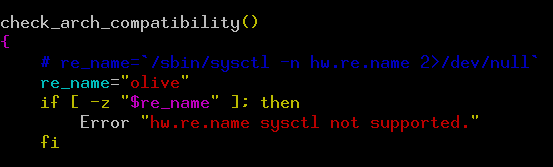
Sadly, this same function needs fixing in two more locations both of which are inside the jinstall-X-domestic.tgz archive. It looks something like this:
-
jinstall-X-domestic-signed.tgz
- +INSTALL — needs fixing here
-
jinstall-X-domestic.tgz
- +INSTALL — needs fixing here
- +REQUIRE — needs fixing here
Uncompress jinstall-X-domestic, edit +INSTALL and +REQUIRE and fix re_name. But before bundling it all back up, replace the well documented "checkpic" file which lives inside pkgtools.tgz which lives inside jinstall-X-domestic.tgz which lives inside jinstall-X-domestic-signed.tgz. Ugh! So the whole picture really looks like this:
-
jinstall-X-domestic-signed.tgz
- +INSTALL — fix re_name
-
jinstall-X-domestic.tgz
- +INSTALL — fix re_name
- +REQUIRE — fix re_name
-
pkgtools.tgz
- bin/checkpic — replace with /usr/bin/true
Once I made these changes, I was almost ready to bundle all the tgz files back up but first the signature and hash files needed to be removed from jinstall-X-domestic-signed.tgz because none of them will match up now that changes have been made inside the packages.
/var/tmp/jinstall# rm *.sig *.md5 *.sha1
/var/tmp/jinstall# tar zcf ../jinstall-X-olive.tgz *
The jinstall-X-olive.tgz package is now ready to install using pkg_add(1).
/var/tmp# pkg_add jinstall-X-olive.tgz
When the install is complete, reboot the system.
Results⌗
During the reboot JUNOS will install itself and then automatically reboot the system again. It'll then come up in JUNOS.
root> show version
Model: olive
JUNOS Base OS boot [10.4R1.9]
JUNOS Base OS Software Suite [10.4R1.9]
JUNOS Kernel Software Suite [10.4R1.9]
JUNOS Crypto Software Suite [10.4R1.9]
JUNOS Packet Forwarding Engine Support (M/T Common) [10.4R1.9]
JUNOS Packet Forwarding Engine Support (M20/M40) [10.4R1.9]
JUNOS Online Documentation [10.4R1.9]
JUNOS Voice Services Container package [10.4R1.9]
JUNOS Border Gateway Function package [10.4R1.9]
JUNOS Services AACL Container package [10.4R1.9]
JUNOS Services LL-PDF Container package [10.4R1.9]
JUNOS Services PTSP Container package [10.4R1.9]
JUNOS Services Stateful Firewall [10.4R1.9]
JUNOS Services NAT [10.4R1.9]
JUNOS Services Application Level Gateways [10.4R1.9]
JUNOS Services Captive Portal and Content Delivery Container package [10.4R1.9]
JUNOS Services RPM [10.4R1.9]
JUNOS AppId Services [10.4R1.9]
JUNOS IDP Services [10.4R1.9]
JUNOS Runtime Software Suite [10.4R1.9]
JUNOS Routing Software Suite [10.4R1.9]