Sep 20
Introduction
The OpenBSD routing table can be carved into multiple virtual routing tables allowing complete logical separation of attached networks. This article gives a brief overview of rtables and explains how to successfully leak traffic between virtual routing domains.
The ability to virtualize the routing table in OpenBSD first appeared in version 4.6. Since then the functionality has matured nicely with support for virtual routing tables now present in userland tools such as dhclient(8) and dhcpd(8) and in the routing protocol daemons ripd(8), ospfd(8), and bgpd(8). Kernel side, pf(4) has been extended to handle filtering of packets based on the routing table they came in on as well as being able to move packets between routing tables. This article will concentrate on the latter with examples of how to setup separate routing tables and leak traffic between them successfully.
Using separate routing tables is similar to using VRFs in Cisco IOS or routing instances in Juniper’s JUNOS. Multiple routing tables are created each of which contain their own forwarding and ARP information. In OpenBSD, each routing table is called an “rtable”. Network interfaces can be bound to an rtable which causes traffic going through the interface to be forwarded based on the information present in that rtable. When one or more interfaces are bound to an rtable, the rtable and all of the interfaces bound to it are called a routing domain, or “rdomain”.
Basic Configuration
Creating an rtable is done using route(8) with the -T argument.
# route -T 1 add 0.0.0.0/0 192.168.1.1
This creates rtable 1 if it doesn’t already exist and adds a default route to it.
Interfaces are bound to an rtable using ifconfig(8) with the “rdomain” keyword.
# ifconfig vic1 rdomain 1
This binds the vic1 interface to rtable 1.
To execute a command within a non-default rtable, use the route(8) command with the exec keyword.
$ route -T 1 exec telnet 10.5.3.29
This executes the telnet command within rtable 1. Certain commands such as ping(8) and arp(8) have their own command line arguments that will place them into an rtable (the -V argument in this case).
Setting up rdomains
By default, all interfaces on an OpenBSD host belong to rdomain 0. Traffic can flow freely between all interfaces (assuming the pf(4) ruleset allows it) without any special handling. Similarly, traffic can flow between all interfaces in the same non-default routing domain without any special handling (again, as long as the pf(4) ruleset passes this traffic).
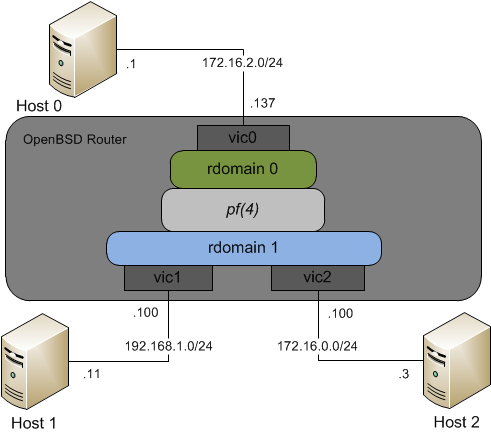
In this network, Host 1 and Host 2 both belong to rdomain 1. Routing domain 1 has routes to the 192.168.1/24 and 172.16.0/24 networks because they are directly attached so traffic between the two is forwarded without any special consideration. Host 1 and 2 cannot talk to Host 0 because Host 0 is connected to a separate routing domain.
As shown in the picture, pf(4) is used to connect routing domains. This is really powerful because pf(4) allows for very fine-grained packet matching which means you can be as specific or broad as you want when it comes to what traffic you want to pass between rdomains. Sending traffic between rdomains is done by using the rtable keyword in pf.conf.
pass in on vic1 to 172.16.2.0/24 rtable 0
pass out on vic0
This is the basic ruleset needed to allow Host 1 to initiate a connection to Host 0.
The rtable must be specified on the rule that matches traffic inbound to the OpenBSD router. As stated in the pf.conf(5) man page, the resulting route lookup will only work correctly if the rtable is specified on the inbound rule. This ruleset is not enough for traffic to flow bidirectionally. We also have to look at the routing entries within the source and destination routing domains.
The source routing domain, in this case rdomain 1, is easy. pf(4) will magically handle taking the packets out of rdomain 1 and sending them to rdomain 0 — we do not need a route for 172.16.2/24 in rtable 1. Reverse traffic is different. Routing domain 0 requires a route be present for 192.168.1/24. The next-hop for this route isn’t really important, what’s important is that it’s present in the rtable. If a route isn’t present, then the route lookup will fail before pf(4) has a chance to move the packet into rdomain 1 and the return traffic will be dropped. Note that the route doesn’t have to be exactly 192.168.1/24, it could be 192.168/16 or even 0.0.0.0/0 — the important part is that there is some kind of route in rtable 0 that will match the network in rdomain 1.
# route -T 0 add 192.168.1/24 -iface 172.16.2.137
This is kind of a cheat. It creates a route for 192.168.1/24 as a connected route on the rdomain 0 interface. Obviously this isn’t correct, but it doesn’t really matter. It achieves the goal of getting a route into rtable 0. Host 1 can now successfully talk to Host 0.
An alternative to creating a “connected” route is to set the next-hop of the 192.168.1/24 route to the loopback IP.
# route -T 0 add 192.168.1/24 127.0.0.1
The loopback interface provides a really convenient place to point your reverse path routes.
The caveat with this is that pf(4) must be active on the loopback interface you create. The default pf.conf ruleset contains “set skip on lo” which disables pf(4) on each loopback interface and will result in return traffic being dropped. Be sure that your loopback isn’t being “skipped”.
The same idea works between two non-default routing domains.
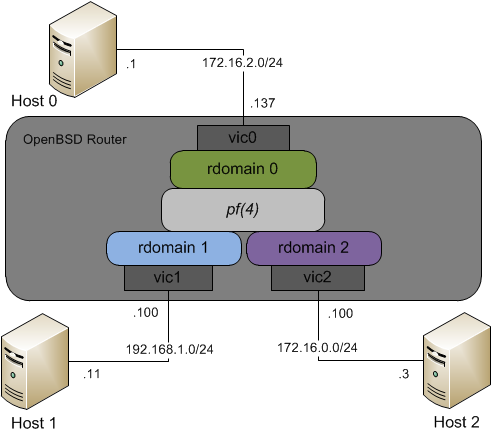
Creating a loopback interface in rdomain 2 so that Host 1 can talk to Host 2 would look like:
# ifconfig lo2 rdomain 2 127.0.0.1
# route -T 2 add 192.168.1/24 127.0.0.1
Since lo2 is created inside rdomain 2, the IP address assigned to it doesn’t conflict with lo0 in rdomain 0.
Another caveat with the pf(4) ruleset is that the states that get created by the rule that specifies the rtable must be “floating”.
If you’ve changed the “state-policy” option in your pf.conf from the default of “floating” then you must use the “floating” keyword in your inbound rule.
set state-policy if-bound
pass in on vic1 to 172.16.2.0/24 rtable 0 keep state (floating)
pass out on vic0
All of the above guidance also applies if you’re doing NAT on the outbound interface.
pass in on vic1 to 172.16.2.0/24 rtable 0
pass out on vic0 nat-to vic0
This ruleset would hide the 192.168.1/24 network from hosts in rdomain 0 by translating the source 192.168.1.x IP to the IP address on the vic0 interface. This might be necessary if there’s already a 192.168.1 network in rdomain 0. Even though you’re doing NAT, you still need a route in rdomain 0 that points back to the real source network (192.168.1/24) in rdomain 1.
Sample Use Cases
Routing domains can be used to isolate a test/dev network from production.
In the sample network from earlier, rdomain 0 could be the production network with production servers and the users connected to it. Routing domain 1 could be a test network where applications and systems are put through testing before being moved into rdomain 0. In order to prevent the test systems from possibly affecting the production systems, they could be isolated in their own routing domain, ensuring that test traffic cannot get into the production network. In fact, the test network could even use the same IP addresses as the production network without them stepping on each other. A pf(4) ruleset could be written that lets management/administrative traffic from the production network into test. A ruleset could also be written that allows the test systems to talk to a specific management or file server in the production network. If overlapping IP space is used, traffic between the rdomains must be NAT’d as outlined above.
Routing domains can also be used to connect to multiple ISPs. Since userland tools such as dhclient(8) work properly within routing domains, each ISP interface could be put into its own routing domain without the risk of conflicting default routes.
Here if vic1 is connected to ISP#1 and vic2 is connected to ISP#2, the pf(4) ruleset would control which ISP connection to use when users in rdomain 0 connect to the Internet. This provides a much more elegant solution than the outbound load balancing example I wrote about in the PF User’s Guide.
The only shared component of a multiple-dhclient(8) setup is the resolv.conf(5) file. Each copy of dhclient(8) will update the file as it renews its lease.
Conclusion
By virtualizing the OpenBSD routing table you can create virtual routers and/or firewalls within the same physical OpenBSD machine. Networks can be safely isolated from each other without having to worry about traffic crossing network boundaries or IP addresses overlapping. Routing domains can be created by binding one or more interfaces to a routing table so that all traffic crossing those interfaces is automatically forwarded based on the routes present in the virtualized routing table. Traffic can be leaked between routing domains by using the granular pf(4) packet matching syntax to allow policy-based communication between routing domains.

40 Comments

Thank you for that insight.
In your opinion, are routing domains suitable to isolate gif(4) tunnels ? To me if I put gif(4) interfaces in another routing domain, the tunnel won’t turn up.
Hey Denis,
I haven’t actually tested tunnel interfaces in an rdomain. I would assume that if you’re doing something like
ifconfig gif0 rdomain 5
ifconfig gif0 tunnel 1.1.1.1 2.2.2.2
that your local 1.1.1.1 interface would also need to be in rdomain 5 and that you’d need a route to 2.2.2.2 in rdomain 5. Is that how you’re doing it?
Have you seen the tunneldomain ifconfig(8) option? It’ll let you place the inner tunnel traffic into an rdomain.
I’m curious now if the gif interface is put into an rdomain and a tunneldomain is not configured whether the inner tunnel traffic would be routed in rdomain 0 or in the gif’s rdomain. That’d be interesting to test.
Hello,
I did some experiment and it is really easy in fact. “tunneldomain” was the directive I was looking for, thank you for pointing !
# ifconfig gif0 rdomain 1
# ifconfig gif0 tunnel 192.0.2.1 198.51.100.1 tunneldomain 0
Rtable 0 is the “regular” routing table and rtable 1 is my isolated network reachable over gif0 :)
Thank you for taking the time to do this write-up—particularly because there is little literature on the subject!
Very interesting and in-depth article of an unknown for me feature of openbsd.
Thanks.
[...] You can read it here. [...]
I used gif and rdomains
ifconfig gif0 rdomain 5
ifconfig gif0 tunnel 1.1.1.1 2.2.2.2
In your example, 1.1.1.1 and 2.2.2.2 are in rdomain 0 by default. This was wonderful to use serveral rdomains with ipsec+gif before reyk explained how to use serveral enc(4) interfaces.
The tunneldomain option is used to place the 2 IP addresses above in the rdomain you want.
Did I have it backwards then? So tunneldomain is for the outer traffic and rdomain for the inner?
Thank you very much for the pointers :)
Thank you very much! A very interesting article for me.
It look like very powerful and interesting.
Thank you. Great Job!
Really nice, I had totally missed this functionality. Thanks!
Nice one, again another reason to dump out those expensive Cisco routers and have a smart OpenBSD box instead!
Thanks! Great howto and that’s exactly what i was looking for.
One small questions, How do I make this configuration persistent? I mean how can I make it survive reboot?
Hey Omer,
Except for the pf policy, everything should be doable in the hostname.if(5) files. Going back to the example network in the article, I would create /etc/hostname.vic1 like this:
descr "Connection to 192.x network in rodmain 1"inet 192.168.1.100 255.255.255.0
rdomain 1
If you needed to add a route to rdomain 0 for a network inside rdomain 1, you could add your route statement to the file as well:
!route -T 0 add 192.168.1/24 -iface 172.16.2.137
If you do it this way just make sure the interface that 172.16.2.137 is assigned to is configured first during boot.
This is a great resource for using rdomains and really helps over using just the man pages. I hope that sometime this will get picked up in the FAQ. I have two questions though:
1) You mention needing to put a route into the domain for return traffic even if using NAT, but I haven’t run into that using 4.9. Was there a change? My test setup used rdomain 0 for the internal IF and rdomain 1 for the outside. The /etc/mygate is set to the ip of the internal IF for rdomain 0 and a default route pointing to the ISP router is added to rdomain 1 via /etc/hostname !directive. Does this work on accident, or should I add a lo2 and a route to the internal (rdomain 0) net in rdomain 1?
2) I have also noticed that any time I create an alias in any rdomain the entry is added to rdomain 0 route table and not the one I specify even with a complete line “family alias address netmask broadcast rdomain n” in my hostname file. Is that normal, or am I missing something?
Sorry for the kind of basic questions, but your post is the first I have run into that does a good job explaining. I am using rdomains to handle a dual-ISP setup, but it is a constant learning process for me.
Hi Russell,
Thanks a lot for your comments and questions.
A1. Your setup is actually working exactly as I described it should. The default route you have in rdomain 1 is enough to match the destination of the return traffic. So for a packet on the return path, it’ll be run through NAT so the packet has the internal, rdomain 0 IP as its destination address. That destination is looked up in rtable 1 and matches the default route there. Since the lookup was successful the process continues and pf moves the packet into rdomain 0 where it is sent to the end host.
A2. I didn’t actually test aliases. That’s a good one. To me, that looks like a bug. Possibly ifconfig is not passing the rdomain to the kernel or the kernel is not adding the host route in the proper rdomain.
Just did some quick testing with alias. I can’t reproduce what you’ve described. As long as my interface is already in an rdomain, all aliases are added correctly and routes are put into the proper rtable. This is on 4.9 and 5.0.
I’m getting “tcp rst” in dual-ISP rdomains mode.
can you please post detailed working config for dual-ISP with rdomains ?
Hi Ilya,
If you provide more information about your configuration, I can try and help you debug it.
After talking out of band with Ilya, this turned out to be a case where sshd was running on the OpenBSD router where rdomains were configured and when trying to connect from a non-default rdomain to that sshd instance, the router was responding with a TCP RST.
One thing the article above doesn’t talk about is sockets. Sockets actually belong to an rdomain. If sshd is started like normal (ie, “/usr/sbin/sshd”), then it opens a listening socket in rdomain 0. As far as rdomain 1 is concerned, port 22 is not listening and the kernel will respond with a TCP RST to any inbound connection attempts to port 22. The solution is to launch an sshd instance for rdomain 1 (ie, “route -T1 exec /usr/sbin/sshd”). This sshd instance will open a listening socket, and because it’s been exec’d in rdomain 1, that socket will be associated with that rdomain.
I can send config privately, what is your email?
Awesome, using routing domains enabled me to build a working proxy-ARP setup for my OpenBSD 5.0 router (ISP gw with x.y.z.1/24 directly on-link, no route from ISP to our own box, and ISP gw itself proxy-arp’s the entire internet to itself).
Separate routing domain for em0 (x.y.z.2/24) to ISP, populate it with `arp -s x.y.z.4-254 pub permanent`, and then set up pf `match in on … to … rtable …` rules on em0 and em1 (x.y.z.254/24 + pub arps for x.y.z.1-2).
It works perfectly for forwarded traffic – but fails for all locally originated traffic on the default routing domain :(
In this setup, rdomain 2 (em0 / ISP link) has the real default route (x.y.z.1), whereas rdomain 0 (em1 / LAN) has a fake default route (also for x.y.z.1, which is either alias’d or arp-proxied back to em1). Seemingly, locally generated traffic never ingresses on any interface, and `rtable …` rules only work on ingress :(
How should the default routing domain and its default route be set up to best keep outgoing traffic from the host itself working, in addition to forwarded traffic?
Hi Tero, thanks for explaining your unique setup. You are right, traffic on the router will not pass through the inbound pf rules and won’t be moved into a different rdomain. The software/daemons on the box need to specify which rdomain their socket should use when they create it otherwise they are stuck in rdomain 0. Lots of OpenBSD daemons have command line or conf file options to set their rdomain. For everything else you’ll have to use “route -Tx exec”.
For simplicity and to avoid the issue you’re having, it’s probably best practice for everyone to keep the main ISP or the one that doesn’t do anything oddball in rdomain 0. It should be thought of as the default ISP and traffic is only leaked to other ISPs/rdomains as needed. This keeps the rule set simple and allows traffic off the router without issue.
Moving the WAN to rdomain0 doesn’t help, because then the routes/hosts on your LAN/rdomainX become unreachable, in the same way… And besides, in this case, the WAN rdomain is full of /32 proxy-arp’d routes for all the LAN hosts, and those are all “fake”..
Well, this is starting to feel a little scary even for me, but I actually managed to hack this into a working state by applying a little NAT:
pass out on $lan_if from self to route lan-egress rtable $wan_domain nat-to $wan_if
$lan_if being the rdomain0/default route destination, and the default route having a ‘lan-egress’ -label attached – very neat way to do the basic `match out on $lan_if to route rtable $wan_domain` btw.
—
Remaining problem I still have is that TCP RST’s generated by `block out on $lan_if …` (i.e. after a `match in on $wan_if … rtable 0` change) are sent out on $lan_if… and the sender behind $wan_if ends up getting an `icmp host … unreachable` reply for blocked ports :/
Nice trick with the route label.
Curious what kind of traffic the router is initiating that is causing you this problem?
1) TCP SYN comes in on em0, rdomain 2
2) `match in on em0 … rtable 0`
3) TCP SYN packet routes out on em1 in rdomain 0)
4) `block out on em1 …`
5) pf generates a TCP RST… and sends it out on the rdomain 0 fake default route intended for leaking traffic to rdomain 2 (i.e. out on lo1) – which doesn’t go anywhere, since it never matches the `match in on em1 … rtable 2` -rule used for routing forwarded traffic.
All in all, it seems that routing traffic between domains doesn’t work all that well :/
Is there any way to work around this? The generated TCP RST in rdomain 0 doesn’t seem to go through pf at all.
P.S: this comment box is getting ridculously small
pf doesn’t keep track of which rdomain a packet came from when it moves a packet into a new rdomain. This is why pf isn’t able to automatically route the RST back using the original rdomain. To avoid this you must filter your traffic on the input interface, before the incoming packet is marked with the new rdomain. And this would go for anybody using rdomain leaking, not just you.
And you’re right, the comment box was getting awfully tight. I changed some CSS around so things look much better now. Thanks.
http://t.co/75GZauf5 Virtualizing the OpenBSD Routing Table
RT @knight_joel: @phessler You bet! Virtualizing the #OpenBSD Routing Table http://t.co/M00Db6ei
Hi, nice article, thanks.
I try to set-up a dual ISP connections with rdomains, but failed to make the correct pf lines.
In http://www.openbsd.org/faq/pf/pools.html#outgoing example is used route-to and round-robin to achieve load balansing. What about rtables? Some working example?
Hi jofcho,
All of the components you need to make a dual ISP setup work are talked about in the article. What does your config look like so far? What works and what doesn’t?
Well, I make all settings, and I’m able to transmit and receive data between domains. But how to make something like:
“pass in on $int_if from $lan_net \
route-to { ($ext_if1 $ext_gw1), ($ext_if2 $ext_gw2) } \
round-robin”
with rtables?
pass in on vic1 to 0.0.0.0/0 rtable 0
pass out on vic0 nat-to vic0
pass in on vic1 to 0.0.0.0/0 rtable 1
pass out on vic2 nat-to vic2
How to combine theese two rules?
I can’t think of a straightforward way of doing that.
Keep in mind that rdomains aren’t designed to do what you’re doing. They’re meant to provide isolation at Layer 3 (and below). You’re trying to do round robin routing to balance Internet use. Stick with the ‘route-to’ method.
Actually I try to make load balancing of outbound connections and use two ISPs.
Maybe this citation misleaded me:
“This provides a much more elegant solution than the outbound load balancing example I wrote about in the PF User’s Guide.”
Ah, I can see why that would be misleading. I meant more in the sense that the pf ruleset is a bit cleaner and that you can do the dual-ISP setup using dynamically assigned Internet IPs with rdomains whereas with route-to, you’re pretty well stuck needing static IPs (because you have to specify the gateway IPs in the ruleset).
Do you perhaps have a example of overlapping subnets for rdomain 1 and 2?
in my case, I’ve setup vlan10 in rdomain 10 and vlan11 in rdomain 11 both have the same network 10.0.0.0/18 and same gateway ip of 10.0.0.1. I can ping both using the ping -V10/11 10.0.0.1 and also the hosts located on the 2 subnets. (vlan10/host = 10.0.0.4 and vlan11/host = 10.0.0.2)
in pf.conf – I’ve added the following,
pass in on vlan10 to 172.29.0.0/16 rtable 0
pass in on vlan11 to 172.29.0.0/16 rtable 0
This allows ping from both 10.0.0.2 and .4 hosts to my external interface em0 (172.29.43.239)
But now I would like to access the host 10.0.0.2 from a host 172.29.43.20 by accessing a natted IP of say 172.29.43.240->10.0.0.2 (rdomain 10).
Hi Danie,
That’s a good scenario. I haven’t tested this, but here’s what I’ve got off the top of my head.
# push tcp/80 traffic into rdomain 10 and do dest addr translation
pass in on em0 proto tcp to 172.29.43.20 port 80 rtable 10 rdr-to 10.0.0.2
# get traffic from rdomain 10 destined to 172-net back into rdomain 0
pass in on vlan10 to 172.29.0.0/16 rtable 0
# setup reverse route in rdomain 10
ifconfig lo10 rdomain 10 127.0.0.1
route -T 10 add 172.29.0.0/16 127.0.0.1
# (no route needed in rdomain 0)
Let me know what you think. I’m interested to know if this works or not. Sounds like you might have all this already except for the first pf rule.
Hi Joel,
thanks for the reply.
The push traffic to rdomain and local loopback for each rdomain did the trick.
I’m still getting used to the idea of rdomains and pf.
Thanks!